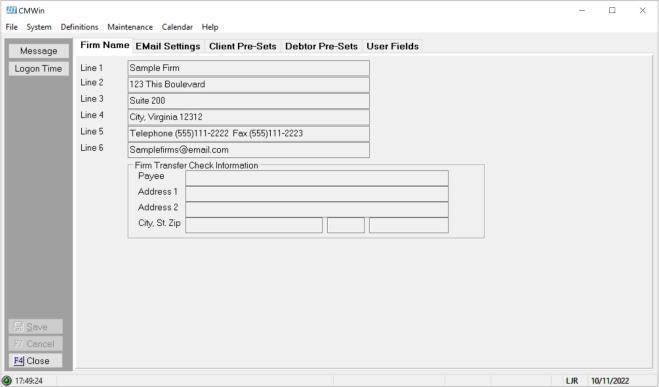
This feature allows the firm to disallow logins to CollectMax during specified time blocks. Once set, no user or automated process will be able to run CollectMax. Supervisors may override the settings.
This is a Version 11 Feature. For information about the purchase of Version 11, please contact Sales.
From the main menu, select System, Firm Information and
click the Logon Time, to display the Allowed Logon Times
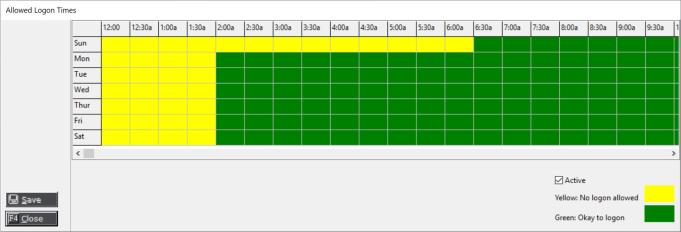
Select the times you would like all users to be out of the system. Yellow means No Logins Allowed and Green means Okay to Logon. You can choose different times on different days, one day or many day and even multiple times a day. Click the box of the time you do not want to allow logins and make it yellow. If you make a mistake, click the box again to make it green. You can also drag your mouse to select multiple times.
Save to set the restriction. If the screen says active, logons will not be allowed during the yellow times.
Once set no users or automated processes such as reports will be able to login in to CollectMax. An override by supervisor is provided.
When trying to login during a time that is disallowed, all users will be show a pop-up screen.
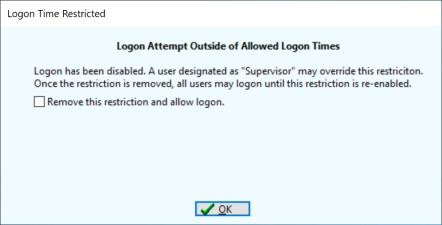
If you are a supervisor, you can check the Remove this restriction and allow logon box. A supervisor login will be required.
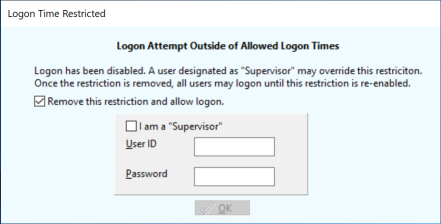
Once the supervisor has successfully logged in to the system, the restriction will be removed and all users can login until the Logon restrictions have been reactivated.
To reactivate after a supervisor login, go to the main menu and select System, Firm Information and then select Logon Time.
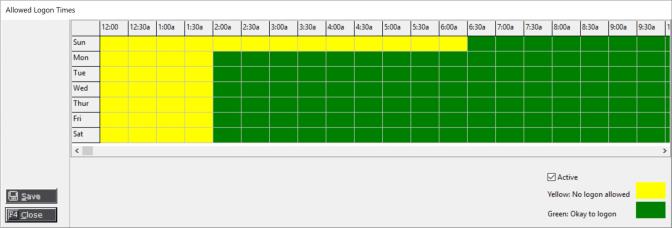
The Active box will be unchecked. Re-check the box to reactivate the same restrictions.
To change the times that lockouts happen, go back to the Logon Times and change the boxes to green when you want logins and yellow to when you do not.
To deactivate the lock out times without losing the times restrictions set in the grid, click the checkbox next to Active on the Logon Times screen and save. This will leave all the yellow and green boxes as is but will not lock users out until Active is rechecked and saved.
Or to deactivate by allowing users in at all times, set all boxes to green and save.